How Long Does It Take To Get TSA PreCheck?
Advertiser disclosure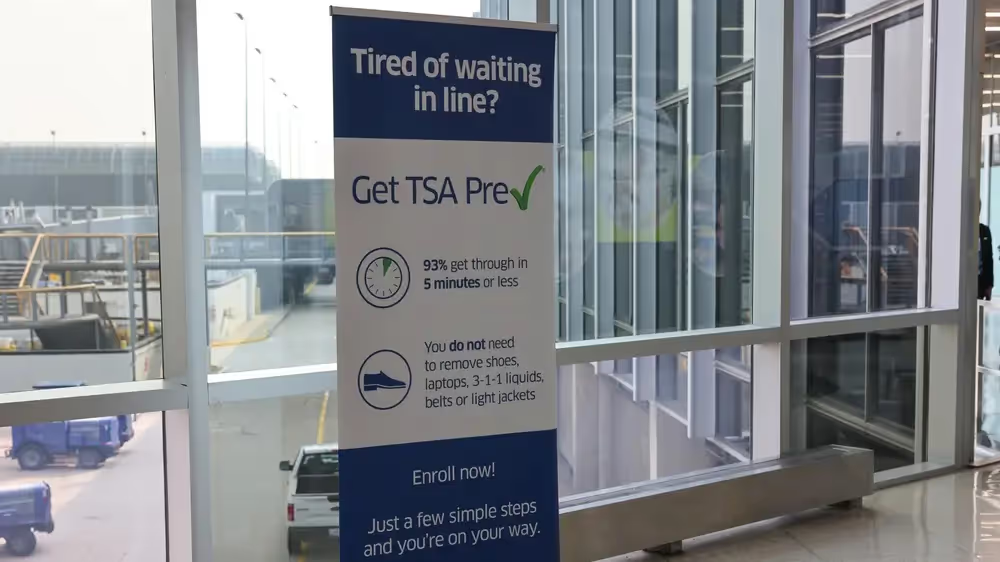



Most TSA PreCheck applicants receive their Known Traveler Number (KTN) within 3 to 5 days of completing enrollment, according to TSA [1]. Some applications take longer, and TSA notes that processing can take up to 60 days [1]. Once you're approved, your membership is valid for 5 years [1].
The program now spans about 200 U.S. [2] and 100 airlines [3]. TSA has also rolled out Touchless ID, allowing eligible PreCheck members to move through security faster than ever [4]. It is now available at 65 airports [3] for PreCheck members with a valid passport [4].
If you're ready to apply now, GOV+ can walk you through the application process in under five minutes.
GOV+ is a private company, not affiliated with or endorsed by the Transportation Security Administration (TSA).
The TSA PreCheck enrollment process
Before you begin pursuing the TSA PreCheck enrollment process, make sure that you are eligible to apply. You need to be a U.S. citizen or lawful permanent resident, and able to pass a criminal background check [1].
1. Fill out the online application
Applying for TSA PreCheck starts with an easy online application. You can start it here with GOV+. The official application is completed with one of TSA's three authorized enrollment providers: CLEAR, IDEMIA, or Telos [5][6].
2. Schedule an in-person appointment
Once your online application is submitted, the next step is scheduling an in-person appointment at a TSA enrollment center. This is where your identity is verified in person — you will present your required documents, complete a background check, and have your fingerprints taken [1]. You’ll also pay a fee, which varies depending on the provider. TSA lists new enrollment prices from $79.75 to $85, and the enrollment provider collects that payment at your appointment.
GOV+ will schedule your appointment for you and guide you through the rest of the process.
3. Receive your Known Traveler Number
Upon approval, TSA will email you a Known Traveler Number (KTN) [1]. This is a number you’ll want to have on hand every time you make airline reservations. You’ll add the number to your booking to indicate that you are a TSA PreCheck participant, which means you can anticipate all the benefits that come from this program upon your arrival at the airport on the day of your departure [1]. Your enrollment will also be noted on your boarding pass [1]. It will be valid for 5 years [1].
Should you need to look up your TSA PreCheck number, you may do so by visiting the TSA PreCheck® KTN Lookup webpage [7].
TSA PreCheck benefits
Once you have successfully enrolled in TSA PreCheck, you should look for the dedicated TSA PreCheck security screening lanes once you arrive at the airport. As a TSA PreCheck program participant, you will not need to remove your shoes, belt, 3-1-1 compliant bag, light jacket/outerwear, or your laptop from your carry-on bag [2][6].
If you have children 12 years old or younger, they may join you in the TSA PreCheck lane even if the TSA PreCheck indicator is not on their own boarding pass, but children 13-17 must have the TSA PreCheck logo on their boarding pass [1][6].
Touchless ID is another new benefit of the TSA PreCheck. At participating airports, eligible PreCheck members can skip the ID hand-off entirely [3]. If you opt in for Touchless ID through a participating airline or Google Wallet, your face serves as your ID at the checkpoint [3][4]. You need a valid passport to opt in, and you should still carry a REAL ID-compliant physical ID as a backup [4].
At this time, about 200 airports participate in the TSA PreCheck program [2], and the full list of participating airlines can be found here [8].
Ready to apply? GOV+ makes the process easy:
New applicants apply through a TSA enrollment provider, then finish at an in-person appointment for fingerprints and an ID check. TSA runs the background check and decides who is approved. If you’d rather skip the paperwork, GOV+ prepares your application and helps you book your appointment.
- One guided form — answer a few questions and we prepare your online application
- Eligibility check — we compare your answers against TSA's published eligibility rules before you submit
- Appointment scheduling — we set up any required in-person visits for you
- Document guidance — we tell you which documents to bring based on your situation
- Real-time tracking — monitor your application status at every step
After TSA approves your membership, GOV+ keeps your membership from slipping through the cracks — with automatic renewal reminders.
Ready to apply for TSA PreCheck? Get started here.
Frequently Asked Questions
1. How long does it take to get TSA PreCheck?
Most applicants receive their Known Traveler Number (KTN) in about 3–5 days, though some applications can take up to 60 days [1].
Want to avoid mistakes? GOV+ can guide you through the process and help you catch common errors before you submit
2. Do I need a REAL ID if I’m using TSA PreCheck?
Yes. Since May 7, 2025, every air traveler 18 years of age and older must present a REAL ID-compliant driver's license (marked with a star) or another acceptable form of identification (like a passport or Global Entry card) to fly within the United States [9].
2. When should I apply for TSA PreCheck before my trip (and how far ahead to renew)?
Apply at your earliest convenience if planning a trip, to account for potential processing up to 60 days. For renewals, do so at least 60 days before your current TSA PreCheck indicator expires [1].
GOV+ can help ensure your TSA PreCheck status never expires with our Renewal Reminders. We’ll remind you well in advance when you need to renew and help you through the process.
3. What documentation will I need at my appointment?
You will need to present documents that verify both your identity and your citizenship or immigration status [10]. The simplest way to satisfy both requirements at once is with a valid U.S. Passport or Passport Card, which counts as proof of both [10]. Lawful permanent residents can use their Permanent Resident Card (green card) the same way [10].
If you do not yet have a passport, you can bring two separate documents instead [10]:
- a government-issued photo ID (such as a driver's license or state ID) to confirm your identity
- an original or certified copy of your birth certificate to establish citizenship
One detail that applicants sometimes overlook: If your name has changed due to marriage, divorce, or a court order, bring the corresponding certified documentation — such as a marriage certificate, divorce decree, or legal name-change order — to your appointment [10]. TSA requires the names on all your documents to match the name on your application exactly [1][10], so this step is easy to miss but simple to prepare for.
Document guidance is something we guide you through if you apply for TSA PreCheck using GOV+. If you want to make sure you’re taken care of every step of the way, start your application.
4. How will I be notified when my TSA PreCheck application is approved? (email, phone, text)
Once your TSA PreCheck application is approved, you will receive a notification via email, phone, or text — whichever contact preferences you opted into during the enrollment process [1].
5. Does TSA PreCheck guarantee I will get expedited screening every time I fly?
TSA PreCheck significantly increases your chances of a faster, smoother experience at airport security — but it does not come with an absolute guarantee. The TSA is clear that no traveler can be promised expedited screening on every trip, due to unpredictable security measures that may be in place at any given airport on any given day, both visible and behind the scenes [1][2].
References
- TSA PreCheck® FAQs · Transportation Security Administration
- TSA PreCheck® Fact Sheet · Transportation Security Administration
- TSA and Google Wallet Launch New TSA PreCheck® Touchless ID Opt-In · Transportation Security Administration
- TSA PreCheck® Touchless ID · Transportation Security Administration
- What Is a TSA PreCheck® Enrollment Provider? · Transportation Security Administration
- CLEAR Becomes TSA’s Third Official TSA PreCheck® Enrollment Provider · Transportation Security Administration
- TSA PreCheck® KTN Lookup · TSA PreCheck® Enrollment by IDEMIA
- TSA PreCheck® Participating Airlines · Transportation Security Administration
- REAL ID FAQs · U.S. Department of Homeland Security
- Required Documents for TSA PreCheck® Application · Transportation Security Administration